The go-to email builder for Salesforce Marketing Cloud
Salesforce Marketing Cloud is powerful for sending and orchestration, but as an email creation environment? Not great.
RGE Studio addresses that production-side gap. It gives more people across your org an easy, drag-and-drop way to create high-quality emails, while SFMC stays at the center of sending, automation, and reporting.


RGE Studio + SFMC: It's a love match
From email creation to export: how it works
From first draft to Content Builder, here's the workflow.

Design your email in RGE Studio
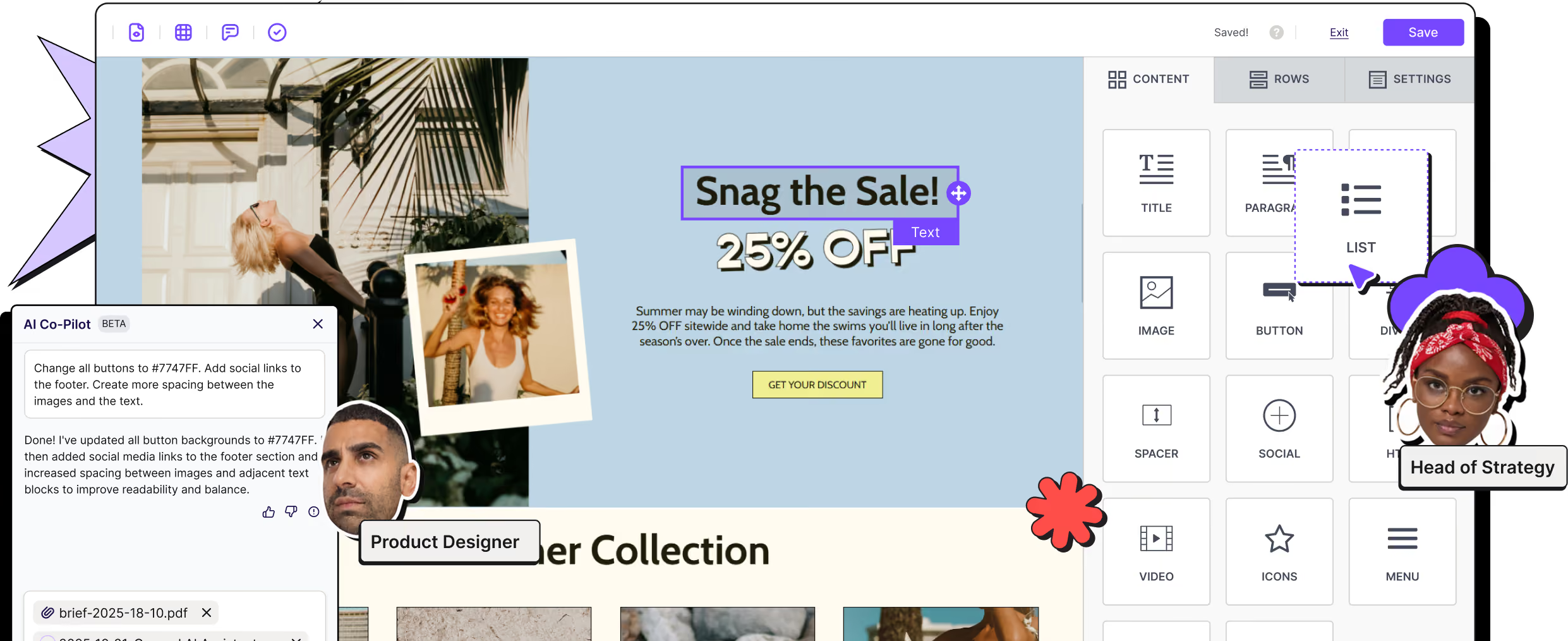
Import an existing HTML file, pick from 1,600+ responsive SFMC email templates, start from scratch, or let our AI Co-Pilot generate a first draft from a brief. Then build visually using our drag-and-drop email builder: no coding required.
Need personalization? Add merge fields, AMPscript or custom HTML blocks directly in the editor. They'll stay intact during export and execute inside Salesforce Marketing Cloud when it's time to send.

Collaborate and approve before handoff
Instead of juggling screenshots and endless email threads, let reviewers comment directly on specific elements inside RGE Studio. Tag teammates. Track revisions. Move through approval stages without leaving the design.

Connect or export to Salesforce Marketing Cloud
Use the workflow that fits your team: both are fully supported, because SFMC teams use both every day.
Push through the connector
Connect your account, choose a destination folder, and send your email into Marketing Cloud Content Builder in just a few clicks.
Export clean HTML
Prefer the hands-on route? Export production-ready HTML with bundled assets and import it into Salesforce Marketing Cloud yourself.
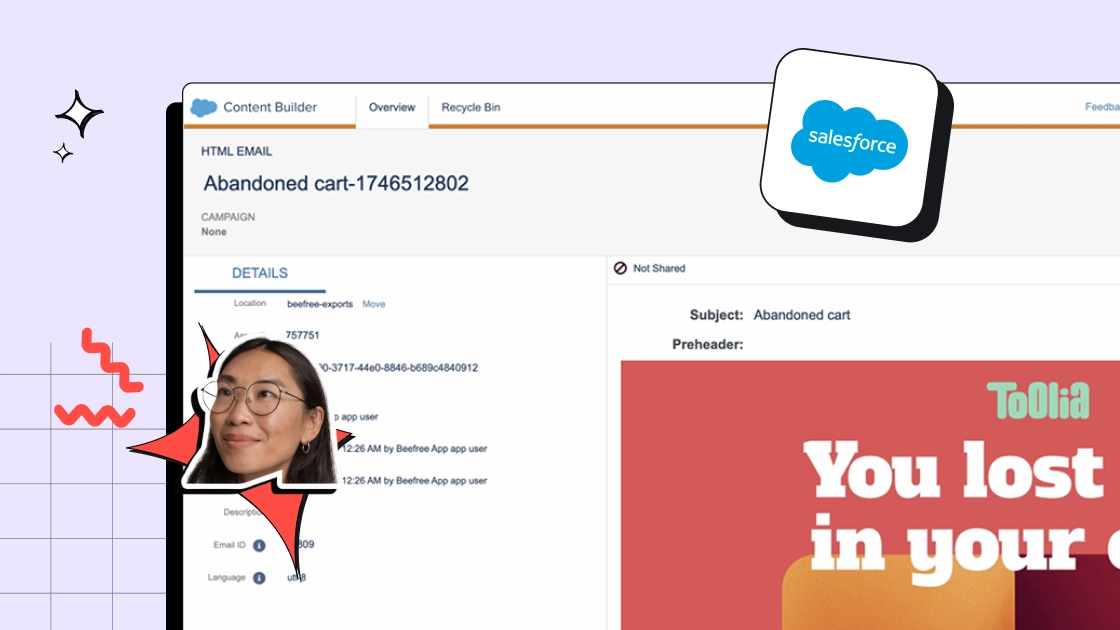
Finalize campaign details inside Salesforce Marketing Cloud
Once your email is inside SFMC, configure audience targeting, automation, data extensions, and Journey Builder Salesforce workflows exactly as you normally would.
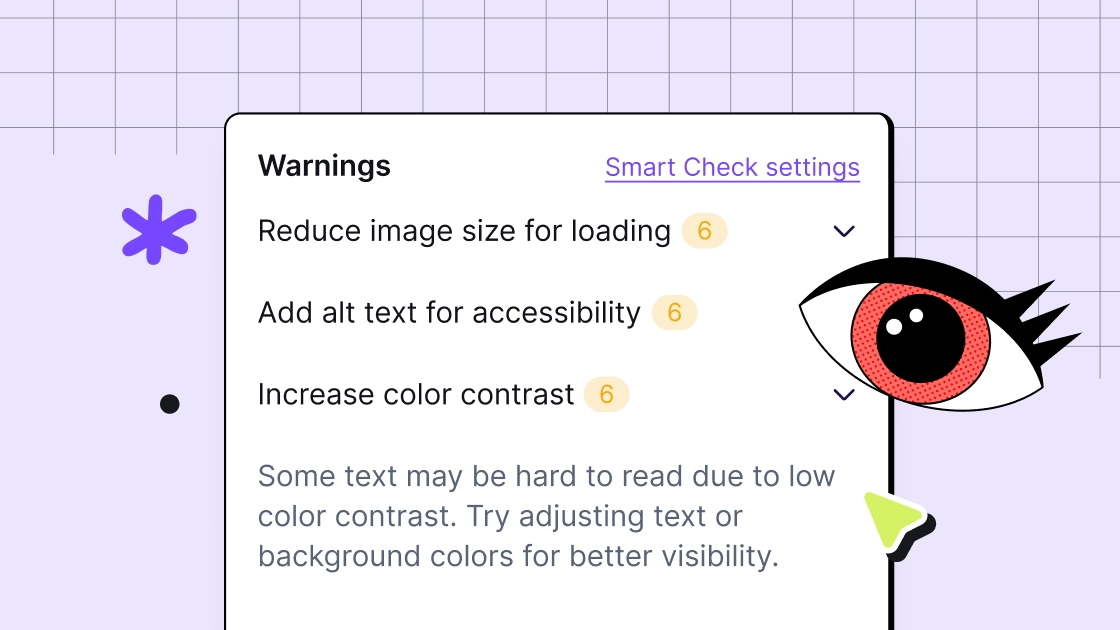
What to check before sending
Before you hit send, run through this quick checklist (or use our Smart Check feature):
- Links are working and tracked
- Mobile layouts look good
- Images include alt text (if needed)
- Subject line and preview text are finalized
- Merge fields/personalization strings are verified
- AMPscript syntax has been checked
- Required compliance elements (like an unsubscribe link) are included
- Final rendering tests are complete inside Salesforce Marketing Cloud
A five-minute QA check beats a company-wide apology email every time.
Collaborate
and stay on-brand
Three regions, five teams, ten campaigns. Set the brand standards once, then let teams create, review, approve, and finalize in one place so emails arrive in Salesforce Marketing Cloud ready to go.

Support regional, multi-brand, and multi-team campaigns
Separate workspaces, role-based permissions, and approval workflows keep things organized without slowing everyone down.
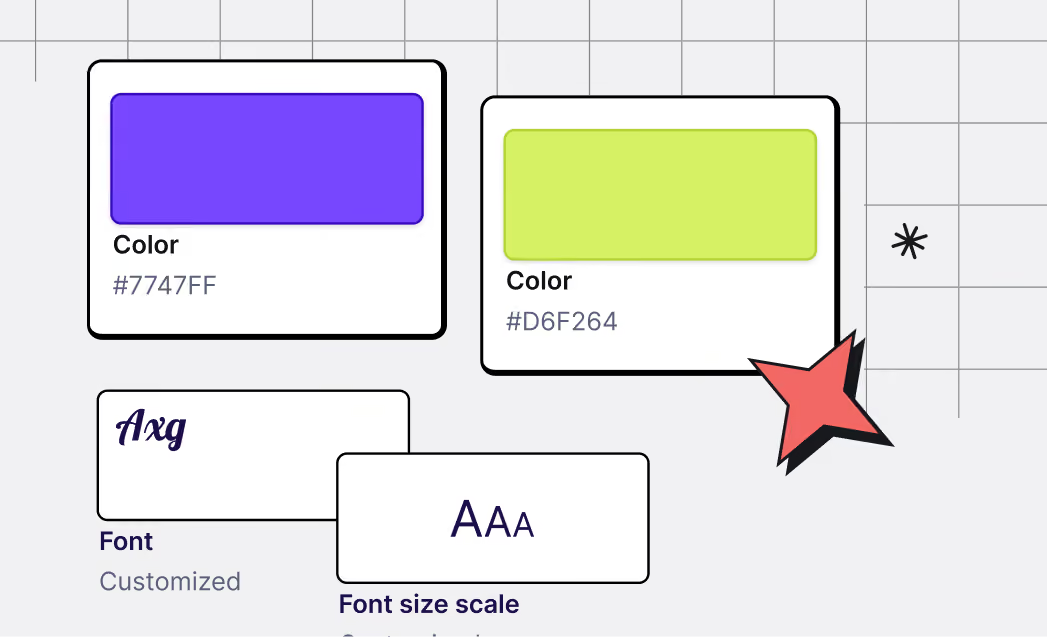
Keep brand control while giving teams flexibility
Set approved colors, fonts, and reusable components, then let teams build within those guardrails.

Review and approve emails before they reach SFMC
Let reviewers comment directly on designs, tag teammates, and approve work — all inside RGE Studio.

Reduce back-and-forth
Keep feedback tied to the email itself. Everyone sees the same version and knows what's been approved.
Free email templates for Salesforce Marketing Cloud
RGE Studio comes loaded with 1,600+ templates designed to help Salesforce Marketing Cloud teams move faster without sacrificing quality.


Start with responsive email templates
Every template in RGE Studio is built to be mobile-friendly right out of the gate. No wrestling with code.

Customize templates for newsletters, product updates, events, and lifecycle campaigns
Our library includes SFMC-friendly email templates for all of your team's campaigns.

Find email design inspiration before you build
In need of inspiration? Browse Really Good Emails's 20,000+ real campaigns, then jump into RGE Studio and bring them to life.
RGE Studio + Salesforce Marketing Cloud FAQs
How does the RGE Studio connector work with Salesforce Marketing Cloud?
Once connected, you design your email in RGE Studio and push it directly into SFMC's Content folder with one click. The email lands in Marketing Cloud as an HTML email — it's accessible via Content Builder and ready to be used in a send, Journey, or automation. Your SFMC sending infrastructure, data extensions, and Journey Builder logic are untouched.
If you prefer, you can also export the HTML from RGE Studio and paste it directly into SFMC manually. Both paths deliver the same clean, production-ready HTML — the connector just removes the manual step, eliminating a potential source of error and saving time every time you deploy.
Why do SFMC teams add RGE Studio if SFMC can already build emails?
SFMC is powerful for sending and orchestration, but many teams find it difficult to use as an email creation environment. Non-technical users often need a more intuitive way to build on-brand emails without relying on HTML or specialist support, and when the native editor feels too technical, teams either bottleneck on a small group of SFMC experts or start pulling in outside tools on their own.
RGE Studio addresses that production-side gap: it gives more people across the organization an easy, drag-and-drop way to create high-quality emails, which shortens training time, reduces dependence on technical users, and helps teams stay anchored in SFMC rather than fragmenting into disconnected tools. SFMC stays at the center of sending, automation, and reporting.
Can RGE Studio help increase SFMC adoption across distributed teams?
Yes — this is one of the clearest use cases. In large organizations, SFMC is often purchased centrally but underused by departments, faculties, or business units because the creation experience is too complex for non-technical staff. RGE Studio lowers that barrier so more teams can create approved emails themselves, without compromising the central SFMC setup. The result is fewer production bottlenecks and more self-sufficient business users, with email requests no longer routed through a small group of experts for every campaign.
Can my team still use AMPscript after exporting from RGE Studio?
Yes. AMPscript can be placed in RGE Studio using merge tags or HTML blocks, and it's preserved in the exported HTML. SFMC renders AMPscript server-side at send time, so the logic executes normally after the email is in Content Builder.
Note: The recommended approach for complex AMPscript functions like ContentBlockByKey() is to use a Code Snippet block in SFMC after export. If you're using heavy AMPscript personalization, this two-step workflow (design in RGE Studio, finalize AMPscript in SFMC) is well-established among technical SFMC users.
When RGE Studio exports to SFMC, what email type does it create?
It creates an HTML Email (not a template-based email). This means the email is a complete, self-contained HTML file. It's not directly editable with SFMC's drag-and-drop WYSIWYG editor after export.
If you need to make post-export changes, you have two options: edit the source HTML directly in SFMC's Code View, or go back to RGE Studio, make the change there, and re-export. For most teams, the RGE Studio workflow eliminates the need to touch the email in SFMC post-export anyway.
Note: There is a workflow for converting an RGE Studio HTML export into an SFMC template-based email (by pasting it as a template instead of an HTML email), which allows SFMC content blocks to be added to it. This is more involved and recommended for advanced users. We've tested it and confirmed it works without SFMC altering the HTML — but it requires some technical familiarity with Content Builder.
We use Dynamic Content in SFMC and build editable content regions. Can RGE Studio support that?
Yes, with the right workflow — and there's an important distinction to understand upfront about how the content gets into SFMC.
To create editable content regions in an SFMC-compatible template built in RGE Studio: create an empty row, drag in an HTML content block, and inside that block add a <div data-type="slot"> with a unique data-key. This tells SFMC you want an editable content region in that row. You then copy and paste the HTML into SFMC as a template — and those regions become available in the template-based email editor, where you set default content and define rules-based dynamic content variations.
The key thing to know: emails pushed via the connector arrive as an HTML email without editable regions. To use dynamic content regions, you need the copy-paste-as-template path, not the connector. (See the export-type question above.)
A practical caution worth surfacing in evaluation: if editors then use the SFMC WYSIWYG editor to change that template, the HTML SFMC generates isn't Outlook-optimized, which can introduce rendering issues. This is an SFMC behavior, not an RGE Studio one — but it's good to know before committing to a heavy WYSIWYG-editing workflow inside the template.
We track links with tracking aliases in SFMC. Can we still do that in RGE Studio?
First, a quick distinction, because these are often conflated: tracking aliases and tracking pixels are different things. RGE Studio does not offer tracking pixels (that's a feature you may have seen from analytics vendors like Litmus/Validity). Tracking aliases, on the other hand, are fully supported.
Aliases let you label individual links so you can tell exactly where a contact clicked — for example, distinguishing a hero image click from a button click when both point to the same URL. In RGE Studio you set this up via Custom Attributes:
- In settings, go to Builder preferences and Enable custom attributes in the builder.
- Click Manage custom attributes and create two attributes: Alias (target "link," blank value — you fill it via an open text field in the editor) and (target "link," with true/false values shown as a dropdown in the editor).
- Once set up, an Attributes section appears when editing any link in the builder, so you can assign different aliases to each link independently — even when two links share the same URL — and set conversion tracking per link
What about SFMC-specific tracking requirements — open tracking pixels, profile center links, unsubscribe links?
SFMC requires certain elements for commercial sends (unsubscribe link, profile center link, physical mailing address, and optionally an open tracking pixel). These don't auto-populate when you export from RGE Studio — you need to include them in your design before exporting, or add them in SFMC after.
The practical approach most teams use: create a saved row in RGE Studio for your standard footer (with the organization address, merge tags, and unsubscribe link), and include it in every template. For the open tracking pixel, you can create a merge tag in RGE Studio settings and insert it as a hidden 1px text block. Our internal documentation covers the step-by-step setup.
We use Dynamic Content and A/B testing in SFMC. Does RGE Studio interfere with that?
No. Dynamic Content and A/B testing are SFMC-level features that operate after the email is deployed. RGE Studio delivers the HTML; SFMC handles everything that happens at send time. As long as the structural HTML is intact (which it is from an RGE Studio export), SFMC's personalization and testing layers work as normal.
Can we control the asset naming in SFMC (e.g., match Customer Key to the email name)?
Yes. RGE Studio can support workflows where the Customer Key in SFMC matches the email name set in RGE Studio, rather than relying only on system-generated values. This is useful for teams that reference assets programmatically or want cleaner, more predictable naming conventions in Content Builder.
Our SFMC emails live inside Journeys. Does updating a design in RGE Studio propagate automatically?
No — and this is worth understanding. When you re-export an updated design from RGE Studio to SFMC, it creates a new or updated HTML asset in Content Builder. If that email is already assigned to an active Journey, you'll need to manually reassign the updated asset inside the Journey for changes to take effect. This is a Salesforce Journey Builder constraint; the same limitation applies even when editing directly in Content Builder.
We're evaluating or migrating toward Marketing Cloud Next (Agentforce Marketing). Does RGE Studio work with that?
Not through a direct connector yet. Marketing Cloud Next is a completely new platform built on Salesforce Core, and a native RGE Studio integration doesn't currently exist. If your team is exclusively on Marketing Cloud Next today, this is a confirmed gap for now.
If your team is still running on Salesforce Marketing Cloud, RGE Studio works with your environment as normal via the native connector. The creation and governance problem that RGE Studio solves — brand consistency, collaborative review, approval workflows — doesn't go away as your Salesforce stack evolves.
What kind of SFMC organization is the best fit for RGE Studio?
The strongest fit is an organization that already values SFMC for enterprise marketing execution but struggles with the production layer. In practice that tends to mean companies or institutions with distributed teams, many non-technical users, strong brand requirements, and a desire to increase adoption — all without replacing their existing SFMC investment. Higher education is a recurring example: many decentralized teams (faculties, departments, communications) that need to send while staying within central brand standards.

Push your content to more of your favorite platforms, with one click
RGE Studio's native SFMC connector is one of the many one-click integrations available across all plans. If you're running Salesforce alongside other platforms, RGE Studio connects with those too.
See what RGE Studio can do for you.
Want to see what this looks like when tailored to your team, stack and needs? We are here to help.