

AI in email marketing: let it do the boring parts
A recap of our September Email Support Group on how email marketers really feel about AI, and how to hand it the boring parts of the job.

.png)
AI Confessions, our latest Email Support Group, kept coming back to one idea, and it's the rule we try to work by ourselves. AI earns its place in email when it takes over the repetitive, mechanical work around each send, while you keep the strategy, the taste, and the final say. Justine Jordan, Head of Marketing and Community at Beefree and Really Good Emails, hosted the conversation with Matt Helbig, Marketing Lead at Really Good Emails, and John Seals, Marketing Automation Team Lead at Baird.
What you all told us about how or whether you’re using AI
More than 1,000 of you took this year's RGE Annual Survey, and 855 answered the questions about AI. The headline number is that 64% of marketers use AI, about the same share as in 2025, but the feelings behind that number are far less settled. Some of you want to use AI and can't because of company rules or security concerns; others never want to touch it. Some were forced into it and are pretty miserable, and most sit somewhere in between.
People at companies that made AI mandatory gave it an NPS of -55.6 and also took the longest to create an email, averaging 9.4 days. Only 1.1% of you start building an email from scratch with AI, and as Justine noted, most AI use isn't going into creative work.
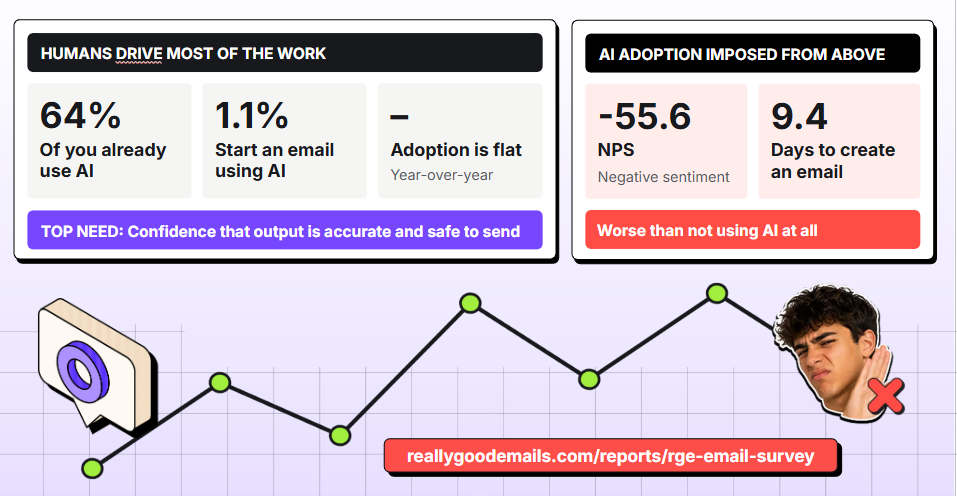
When we asked what would make AI practical in your email workflow, 53.5% of you wanted confidence that outputs are accurate and safe to send, 40% wanted AI integrated into the tools you already use, 32.9% asked for data privacy guarantees, and 26.8% for better brand controls and guardrails.
About a third also asked for clear guidance on where AI is useful and for training on prompting. One respondent described the reality of disconnected tools as endless copying, pasting, and tab switching. Justine said that feedback has gone straight into the tools we're building, and you can dig into the full data in the 2026 RGE Survey report.
Let AI do the parts that aren't fun
Our response to that feedback begins with our AI Manifesto, which Justine boiled down to a single idea. We want AI to give you back a better version of your job and help you create good digital content, so the focus is on automations and workflows, the repetitive parts of email, while you keep the parts you like.
Kelsey Yen, our Lifecycle Marketing Manager, wasn't on the panel, but when Justine asked what she'd want the audience to hear, she put the same principle in her own words.
"I want AI to do all the things that are not fun. And for me, creating the email is the fun part. I don't want to hand that off to a robot. That's the one part that's joyful."
The same thinking led us to build the RGE Studio MCP. If the term still sounds abstract, an MCP is simply a way to connect the AI tools you use to the other apps you work in. Justine uses Amplitude's MCP through Claude, for example, to request data in plain language instead of clicking around a platform she has never found intuitive.
How Baird automates emails with the RGE Studio MCP
John Seals’ team sends a lot of emails, and his approach to AI, which started out of curiosity, puts people first. For them, no solution should replace the team's critical skills. The goal is to automate formulaic work like the clicking and retyping nobody loves.
Why RGE Studio was a safe place to start
For Baird, RGE Studio holds very little sensitive data and no email addresses. As John put it, if something goes wrong, you end up with an email you delete and move on from. That small downside, weighed against the time his colleagues could save, is also how he got buy-in in a regulated industry like finance.
How the workflow runs
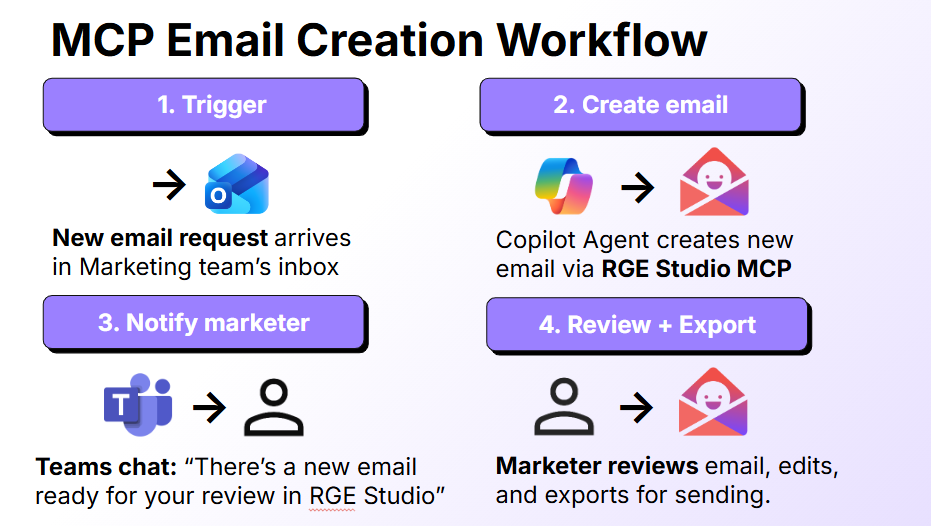
Baird sends one type of announcement email again and again. Each one starts with an internal request form that lands in a Teams inbox and triggers a Microsoft Copilot agent connected to the RGE Studio MCP. The agent builds the email from a template, and usually, within a couple of minutes, someone on the team gets a Teams message saying a draft is ready. A marketer then reviews, edits, and prepares it for sending, so a human is always in the loop. Marketers can also chat with the agent and attach a copy doc, or skip AI entirely and build the email by hand.
The bracketed template
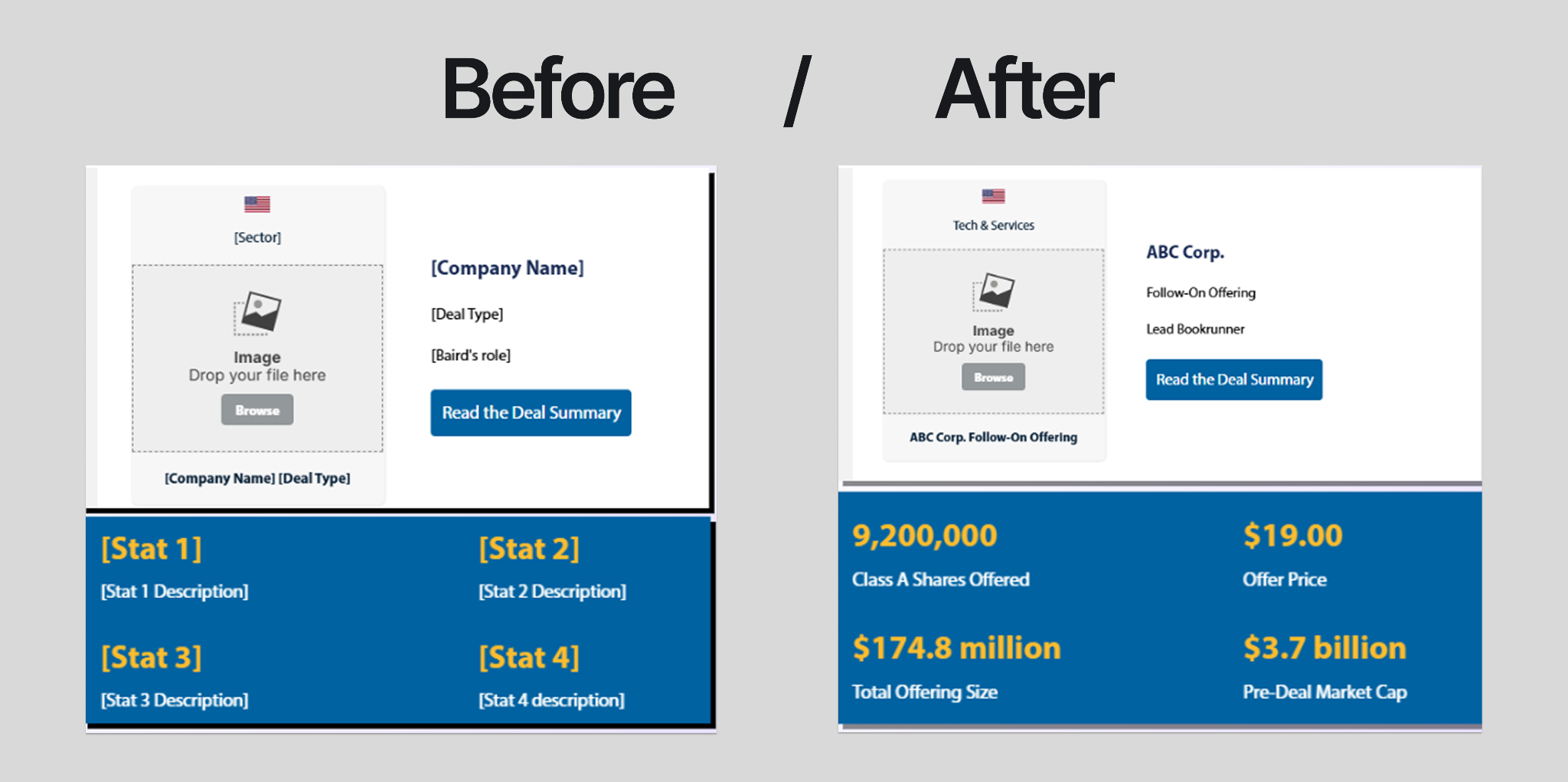
The template was designed by John's team, with no AI involved, and every detail that changes from send to send (stats, company names, button links, contact info) sits in brackets. The agent follows general instructions for working in RGE Studio, such as always defaulting to the workspace's saved styles and saving emails in the same folder. On top of that, it has a skill for this task, meaning a reusable set of instructions for one specific job.
If you want to try this yourself, the strictness of that skill is what makes it work. It tells the agent to "substitute bracketed placeholder text in the email template with text that the user provides" and adds, "Do not modify email styling or formatting." Then it keeps going back and forth with the user until all placeholders are filled. When something is missing, it asks, "you didn't say anything for stat four, do you want to keep it or remove it?" John noted that in the Microsoft world, this requires Copilot Studio or help from IT, and that the setup is more straightforward in other AI tools.
How we apply the same principle at RGE
Some software companies call using their own product "drinking their own champagne." With an Italian parent company in Milan, we decided we're "eating our own cheese," a choice we fully stand by.
Building the newsletter from a brief
Mike Nelson, RGE co-founder and newsletter wrangler, has Claude connected to the RGE Studio MCP. His brief asks it to copy an existing newsletter, swap in the new subject line, preview text, and all the content copy, and leave the footer alone, since that's where our legal and compliance details live. According to Justine, he sometimes does it with Claude Voice from the treadmill.
Turning sales notes into designed follow-ups
Alec Levandoski, our Growth Enablement Manager, showed how our sales team turns call notes into designed emails. An agent already drafted a follow-up from every call transcript, and reps used to paste that text into their composer, remove links, and add a personal note. Now, an n8n agent drops the draft into an RGE Studio template built with our design team and sends the rep a link. The rep edits it in RGE Studio and exports it through the Gmail or HubSpot connector, so prospects receive an email with our logo, brand colors, and easy-to-scan links, sent by reps with no technical skills.
Handing off the reports, keeping the emails
True to her own rule, Kelsey Yen doesn't use the MCP to build emails; she saves AI for reports, stats, and research. She had Claude comb through our "Great Questions" Slack channel, which collects moments from Gong sales calls, to find topics for onboarding emails, and it found that organizing designs into folders had come up on nine separate calls. She also asks the Customer.io agent to recap her A/B test results, which, in her words, saves her "so much time not having to download reports to make spreadsheets and charts." You can read about those real tests in our email A/B testing ideas article.
How to apply it to your own email workflow
Start from the prompt library
Matt couldn't find prompts that fit what email marketers actually do, so he helped build the RGE prompt library, with about 75 prompts that work with the MCP. John's favorite kind of prompt is one that checks an email against Baird's brand standards and compliance language. Matt's favorite is writing alt text, since many emails reviewed on Really Good Emails are missing alt text on some or all of their images. He gives AI strict rules on what good alt text looks like, lets it describe what it actually sees in the images, and has it read the whole email back as a final check.
Give AI a bigger job
If AI let you down a few months ago, Matt suggests trying again, because the models have improved a lot, and giving them more to work with than "write me a subject line." These are his suggestions, along with a few requests you might not think to make.
- Share context about your audience, tone of voice, and the purpose of the email, and ask AI to interrogate you with 50 or 100 questions before it starts.
- Define what "done" means, like an email that's fully QA'd and ready to send, and plan with AI before the first draft instead of spending hours fixing a weak one.
- Use dictation when typing gets old, recording yourself as you explain how a flow works and letting AI organize it. Justine does this at the end of long days, when she can't make words come out of her fingers anymore.
- Ask AI to audit your entire onboarding series for the biggest drop-off points, or to act as a second pair of eyes on an abandoned cart flow.
- Hunt for patterns you'd never have time to find yourself, like shifts in subject line language over the years or CTA copy that performs across 50 emails. Connected to the MCP, AI can review a whole folder of emails.
Turn what you repeat into skills
If you've done something more than twice, keep correcting the same thing, or someone keeps asking how you do it, Matt suggests turning it into a skill. His favorite is a QA skill fed with past mistakes and root cause analyses, so old errors don't come back, and AI can even click through every link to check that the CTA matches the landing page.
We also built brand voice skills trained on ten years of Mike's newsletters, because, as Matt put it, we all want to sound like Mike, and nobody can clone him. One skill writes in the RGE voice, a voice coach only flags where your tone drifts, and an "unslop" skill from Lauren Tan's pstack makes AI text sound more human. As for AI tells, Justine is keeping her em dashes, and you can pry them from her cold, dead hands.
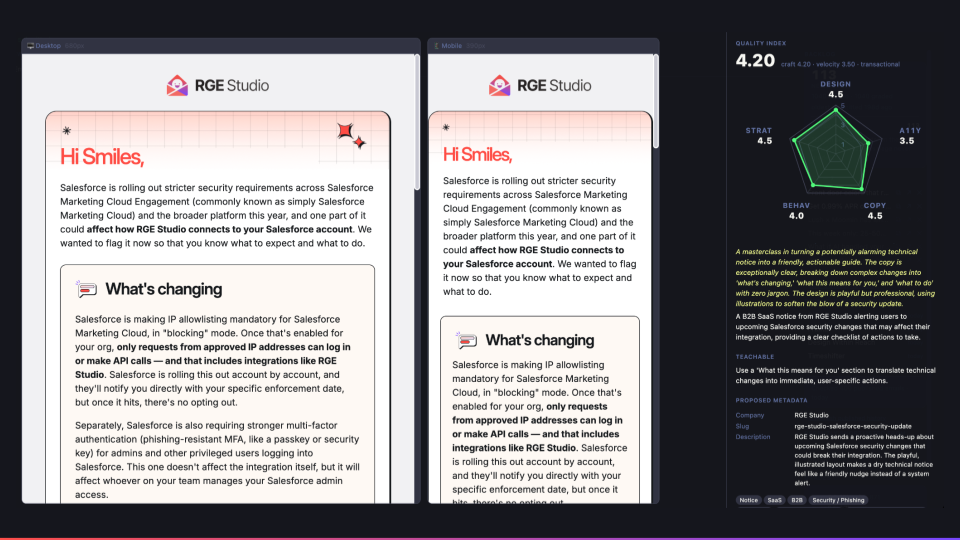
Matt's most ambitious skill is the Quality Index, built over six months from recordings of him and Logan reviewing emails, every Feedback Friday, and every Unspam talk. It scores an email on design (25%), accessibility (20%), copy (20%), behavior (20%), and strategy (15%), tells you what to fix, and works with the MCP to apply the changes. Matt has graded almost 20,000 emails with it, pulling a teachable moment from each featured one.
The confessions
Even the people who use AI every day have complaints, and the session lived up to its name with an airing of AI grievances near the end. Justine shared screenshots of our team arguing with Claude, including one where it admitted, "The first two sentences were yours, just reworded. The third I made up." John would much rather hear "Just tell me if you're wrong" than another placating "you're right to push back on that," and Matt wishes AI would stop building a refrigerator website when he only wanted a refrigerator recommendation.
What we dug into in Q&A
Will AI replace email marketers?
John sees AI as another tool, like Excel or Word; typing a copy doc into a template doesn't take expertise, and automating it gives marketers time for what they're good at, like asking a stakeholder, "have you ever thought about trying it this way instead?"
Justine reminded everyone that no one chooses email, email chooses you, so we all arrive with different strengths. Coming from a design background, she has always found the data side slower and harder, and AI helps her make fewer errors. She thinks of AI as an eager intern that's only as good as your instructions, the same comparison Aubrey Miller made in her talk on getting on-brand copy out of AI. Matt added that deadlines are real, and AI can help you fit in things you couldn't before, like an extra A/B test.
Can the MCP build customer journeys?
The RGE Studio MCP can't build a journey inside your ESP, but if your ESP has its own MCP, you could chain the two, building the email with one and moving it with the other. We don't run workflows end-to-end ourselves because we want human QA checkpoints along the way.
Your name is still on the email
For Justine, using AI well has meant using hers even more, since it pushed her to learn things like statistical significance so she could direct it better. When someone asked whether a company could automate everything from strategy to design, nobody on the panel pushed for it. John would keep strategy human, while Matt pointed out that good personalization, like good design, is invisible, and that his inbox is filling up with emails that look like Claude made them. Justine warned about a sea of sameness and called any process without frequent, transparent human checkpoints probably dangerous.
As John put it, the email has your name on it, so whether AI helped or not, it has to meet your own standards. If you want to try any of this, you can connect the RGE Studio MCP to the AI tool you already use. And in October, Matt is back with a new Email Glow Up on healthcare and pharma emails, where the real bottleneck tends to be the process around them. Save your seat.
Articles to wet your whistle

.jpg)

Subscribe to our newsletter.
Dive into the world of unmatched copywriting mastery, handpicked articles, and insider tips & tricks that elevate your writing game. Subscribe now for your weekly dose of inspiration and expertise.