

Healthcare email design: how to fix the pamphlet problem
See how two healthcare email redesigns use clearer hierarchy, accessibility, and content order to make messages easier to trust and act on.

.jpg)
Too many healthcare emails would fit right in on a waiting room rack, next to the brochures nobody picks up. That’s how Matt Helbig, Marketing Lead at Really Good Emails, summed up the more than 190 healthcare emails he collected for our October Email Glow Up, from pharma and insurance to telehealth and dental.
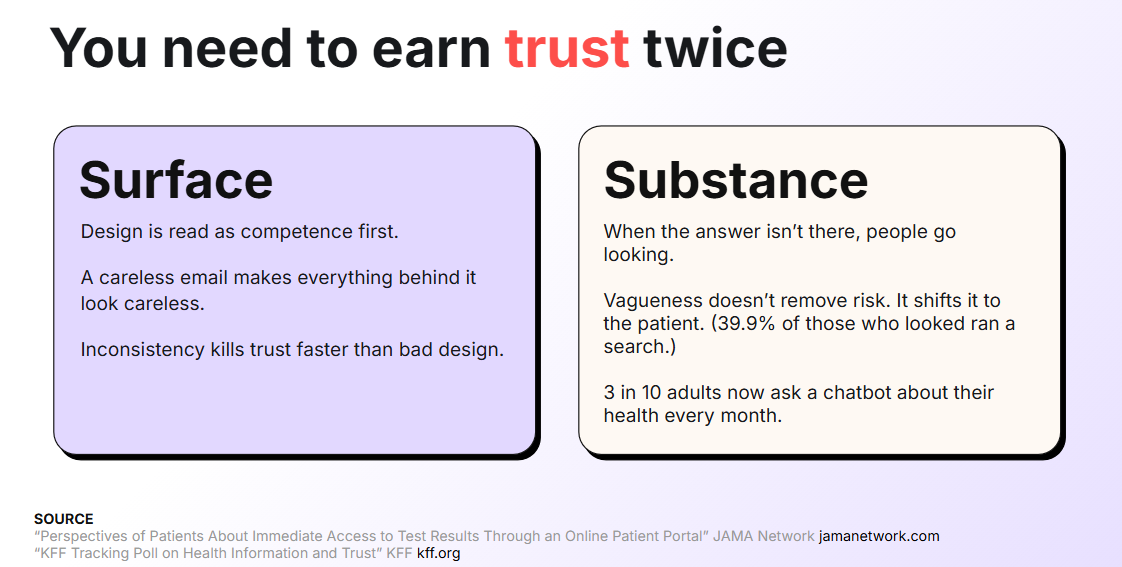
In healthcare, that’s more than a design flaw. The person reading may be worried, may be reading on someone else’s behalf, and is deciding whether to trust you before reading anything closely. That’s why, as Matt put it, a healthcare email has to earn trust twice, first with how it looks and then with what it says.
With senior designer Yuliana Pandelieva, he rebuilt two of those emails live in RGE Studio, a Children’s Health newsletter and a Hale welcome email. Below is what they found, and what changed in each one.
The pamphlet problem, in five patterns
Across the 120+ emails in our sample, five habits did most of the damage, and together they make an email feel like something you’d pick up in a waiting room and put back down.
- Four or more asks at the same visual weight. Most of the emails we looked at had this, and when everything looks equally important, ignoring it all becomes easier than choosing.
- “Learn more” on every button. It tells your reader nothing about where the click goes, so there’s little reason to make it.
- Centered body copy that runs past four lines. It’s hard to read, and it showed up in the majority of the emails.
- No way to ask a follow-up question. Plenty of emails had no reply-to address and no phone number, which leaves an uncertain reader with nowhere to go next.
- Low-contrast buttons. They fail accessibility guidelines and make the one thing you want people to click easy to miss.
Yuliana added that a lot of the emails simply felt generic and templated, at a time when email can be very personal. Yuli joked that once an email passes 15 CTAs, it might be time to rethink the content. If you want to see those patterns for yourself, the full sample and both rebuilds are in our public Figma file.
Why healthcare emails have to earn trust twice
Your readers decide whether to trust a provider long before the first visit. According to rater8’s 2026 Patient Choice Report, three in four patients won’t book with a provider rated below 4.0 stars, and 55% have already walked away from a doctor because of something they read online. If your email confuses them, Matt warned, they will simply find someone else.
The first round happens on the surface. Research from the Stanford Persuasive Technology Lab found that people judge credibility by how something looks before they read it closely, and email works the same way. You can have the best practice or the best product around, but a careless email makes everything behind it look careless, and an email that doesn’t match your website or your app erodes trust even faster.
The second round is about substance, and this is where Matt thinks many healthcare emails play it too safe. Vague copy feels like the careful option because it avoids claims you can’t back up, but as Matt put it, “vagueness doesn’t just remove risk. It also shifts it to an actual patient,” who then goes looking for an answer somewhere else. More and more often, that somewhere is a chatbot, since 29% of US adults now use AI tools for health information at least once a month, according to KFF’s June 2026 poll.
A handmade look reads as more human
A few healthcare brands are already winning that first round. Amperos, which helps providers recover insurance revenue, adds hand-drawn textures to a SaaS-style design, and Matt liked that handmade feel because, with AI-generated visuals everywhere, it makes the brand feel less sterile and more human. Yuliana agreed that texture and grain feel far more human than the sterile, stock-photo look healthcare has relied on for years, and Silna makes a similar case with friendlier type. If you want to dig into why visual choices like these work, our Design Trends 2026 recap breaks down the principles behind them.
Write for the reader who’s worried
The person a healthcare email is meant for may not be the one opening it. A parent, a caregiver, a clinician, or someone handling insurance may get there first, and each of them arrives with a different question and a different level of stress.
Personalization is harder when so much patient data is protected and can’t be used in an email, so Matt suggests leaning on segmentation and timing instead. You can tailor an email to who’s reading, to where they are in the process (researching, booked, in treatment, or lapsed), and to what the calendar says, like six months since a last visit or an enrollment period about to close.
Relevance matters over time, too. Bot opens have made open rates less reliable than they used to be, and Matt pointed out a quieter risk on top of that. Ten irrelevant emails in a row train your reader to skip you, so when the important one finally arrives, it gets skipped too.
Every email should ask for one decision or one action, in words your reader actually uses. Matt sees it as a long-term investment, because language that makes readers feel understood is what builds trust over time.
Make every email accessible by default
Knowing your reader also means remembering that some of them will struggle to read your email at all. Healthcare is meant for everyone, so your list includes people with permanent, partial, or temporary disabilities, as well as older readers with low vision. In practice, that means keeping your main message in live text at legible sizes instead of baking it into an image, meeting WCAG AA contrast, writing alt text that reads as a full sentence, and checking how your images and styles hold up in dark mode. If you build in RGE Studio, Smart Check flags missing alt text, small text, and contrast issues before you export, so you catch them before your readers do.
It’s also becoming a legal requirement, as Matt pointed out. Under ADA Title II, state and local government entities in the US, public health systems included, have to meet WCAG 2.1 AA by April 26, 2027, or by April 26, 2028 if they serve fewer than 50,000 people. The rule covers websites and apps, not email, but if your website has to meet that standard, sending people a less accessible email is hard to justify.
When we asked attendees what slows their team down the most, legal review got the most votes. Yuliana picked a less popular answer, every team running its own version of the template, because as the designer, she receives the email at the very end, after everyone else has had their say. That’s worth keeping in mind for the glow ups below, because much of what changes in them is structural, like the order of the sections, the weight of each block, and where a disclosure sits, while most of the underlying content stays the same.
Glow up #1: the Children’s Health family newsletter
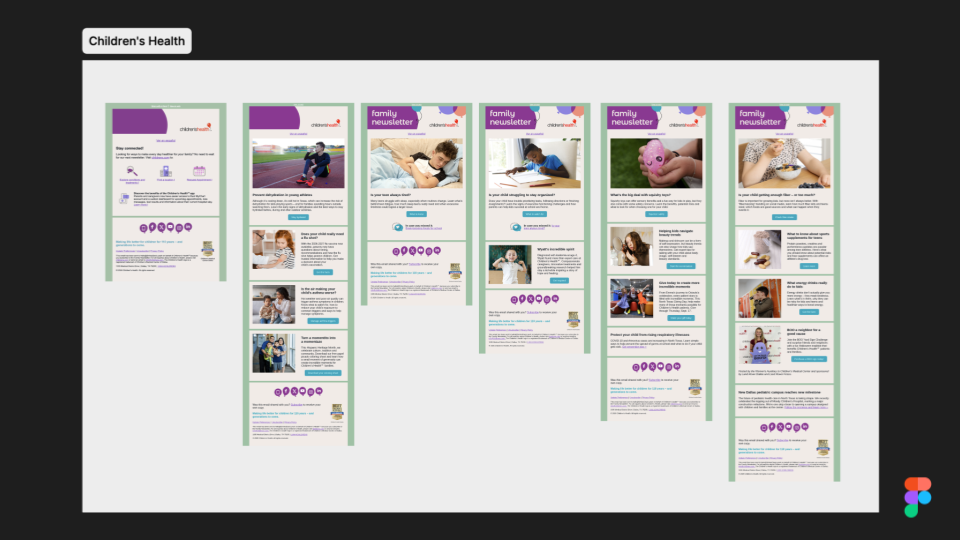
Children’s Health, a pediatric health system in North Texas, has a website Matt really likes, and emails that, as Yuliana put it, weren’t even cousins of it. For an anxious parent looking for help for a sick child, landing on a website that feels like a different organization is a rough first experience. Her goal was to turn three or four short newsletters with similar content into one flexible template the team could reuse every month.
Make the email look like the website
Yuliana started by pulling the brand colors straight from the website, since the ones in the emails had drifted. She made the logo more visible, gave the “View in browser” and Spanish version links more room, and added the month at the top so readers know which issue they’re looking at. The illustrations and the button hover effects came from the website too, so moving from inbox to site feels like staying in the same place.
Move the health alert to the top
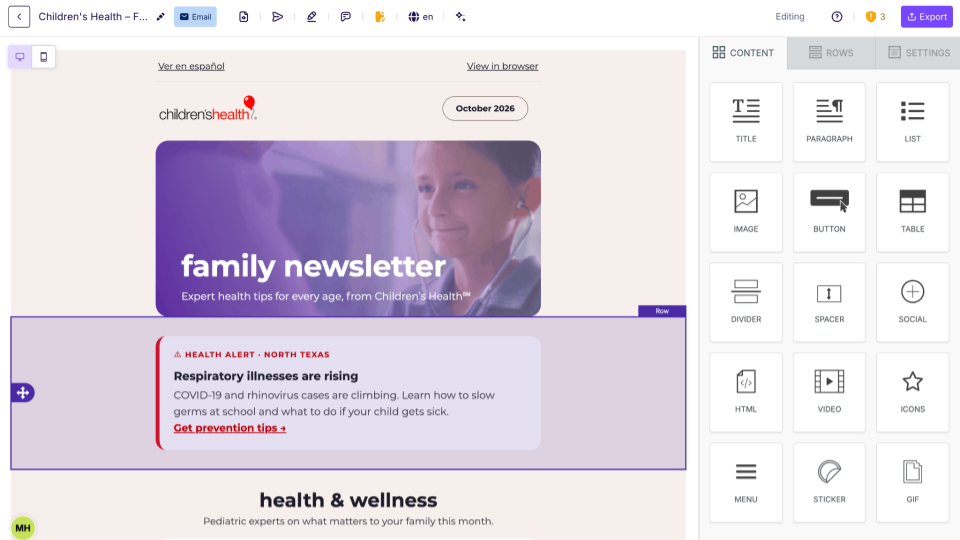
In the original, a very important health notice sat right above the footer, competing for attention with the regular articles. Yuliana gave it its own block near the top, with a clear label and a single link. Matt suggested taking it one step further with dynamic logic, so that if you have the segmentation data, readers in North Texas could see a local alert while everyone else gets a general one.
Give one story the lead
The new layout has one lead story, and every other article supports it in card modules. Matt usually isn’t a fan of two-column layouts, but here the cards carry enough weight on desktop and stack neatly on mobile. Yuliana also made the buttons more specific, so “Get the facts” became “Get the flu shot facts,” and admitted that not every company would be open to copy changes, though this email needed them.
Wyatt’s patient story got more space and a pull quote, because for parents, hearing from a family who went through something similar can be the main reason to click. The “In case you missed it” section also grew from a single line into a full block, so evergreen articles get more than one send.
Design for a parent holding a phone
Yuliana designed for mobile first, since most parents will read this on their phone. In her words, “if you’re looking for this type of content, you’re probably on your kid’s bed.” Everything stacks cleanly, and the buttons go full width so you can tap them with one hand.
Lock what legal already approved
The footer keeps quick links separate from the social icons and legal text. In RGE Studio, you can lock a footer like this so nobody on your team edits it by accident, and save it as a synced row, so when your privacy policy changes, you update one block and the change carries over to every template that uses it. Matt also showed how to create a Spanish version of the same email in the editor, and how to send the finished email to Salesforce through the connector or export it as HTML for any other ESP.
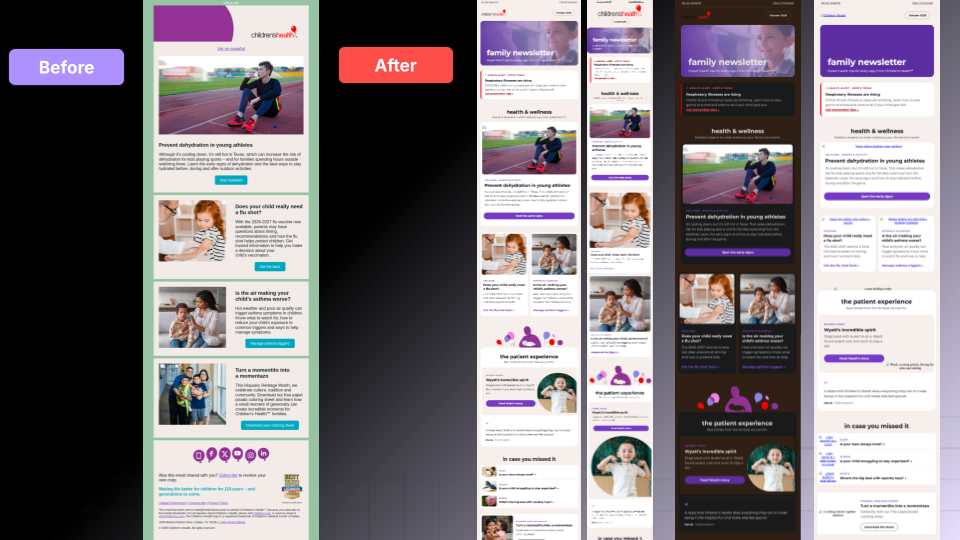
With images turned off, the email is still readable because everything is live text, and it holds up in dark mode too. The white-on-teal buttons in the original had a contrast ratio of 2.86:1, and the new version passes AA. If you send a monthly newsletter, this is the setup worth borrowing, a template where the alert always has a home, one story gets the focus, and the sections legal already approved stay in the same place every month. You can import the Children’s Health rebuild into RGE Studio and take it apart yourself.
Glow up #2: the Hale welcome email
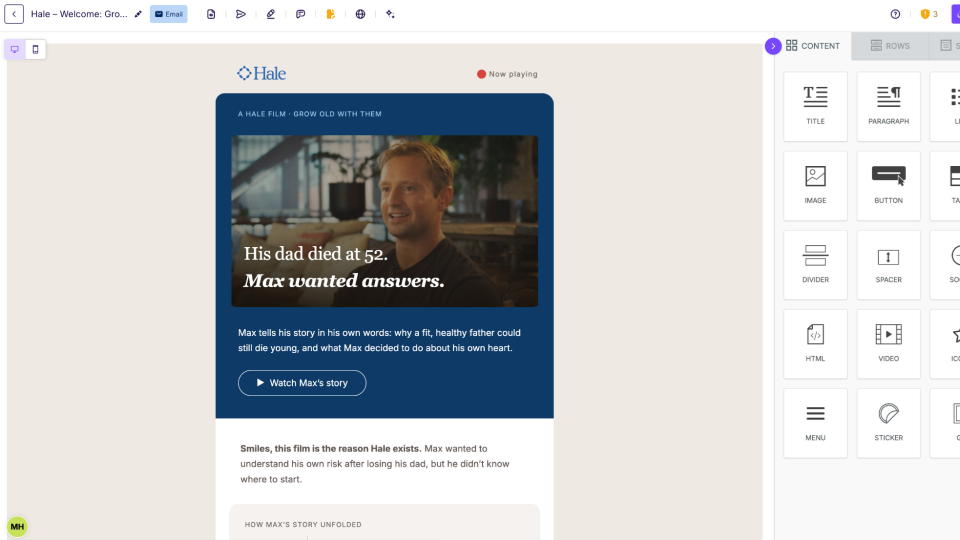
Hale is a newer preventive heart-health brand, and like Amperos, it uses grain and personal photography that make it feel human. Its welcome email tells the story of Max, whose father was fit, active, and died of a heart attack at 52. Through Hale, Max found plaque in his own arteries at 31, and the brand turned his experience into a launch film called Grow Old With Them. Everything was already in the original email, but it read like a product launch, and the emotional part was easy to miss. Yuliana rebuilt the whole email around Max’s story and let the product come in only after it.
Put the film first
The redesign opens on a dark, cinematic panel with a small “Now playing” label in the corner, a purely visual nod to the film. The button became “Watch Max’s story” with a play icon, which Matt found works much better than a plain CTA, and the intro greets the reader by first name.
Turn paragraphs into a timeline
Under the film, the paragraphs became a timeline with three moments: 52 for his dad’s heart attack, 31 for Max’s scan, and now for the plan he follows today. As Matt pointed out, people rarely read everything, so doing a little extra work to turn a story into a timeline makes those three moments easier to scan. In RGE Studio, each step is a row you can duplicate, so the timeline grows or shrinks in a few clicks.
Move the disclosures next to the story
Two things that used to sit in the footer moved up into the content. The first is the note explaining that Max’s results are his own, that yours may be different, and that a heart scan isn’t a diagnosis, which reads as transparency instead of fine print once it sits next to the story. The second is the credentials of Dr. Michael Blaha, the preventive cardiologist quoted in the email, which now sit right under his quote, where they back up what he says.
Let the product follow the story
After a pull quote from the film, the email moves to what Max did next, with his photo and his own plan, and only then to the Heart Scan. Matt liked that it doesn’t feel too salesy, and that the price ($249) is right there in the email, something many brands don’t manage to include. As Yuliana put it, “people connect with people and people’s stories a lot more than with products.” The email closes with a sign-off from the Hale team, an invitation to just hit reply with questions about your heart health, and a short note that Hale isn’t for emergencies, with a reminder to call 911. Matt thinks a disclaimer like that is worth adding to some of your emails, too, especially ones about topics like mental health.
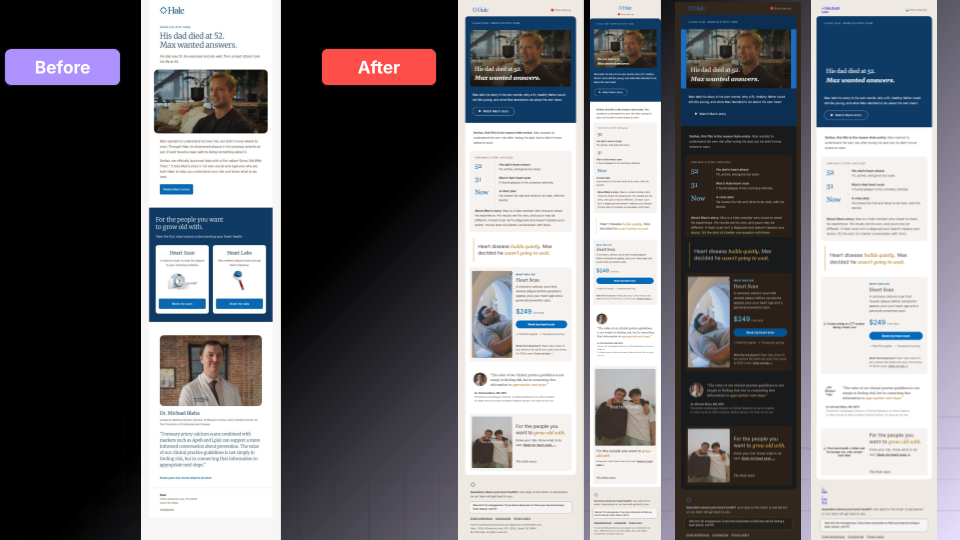
The redesign holds together in dark mode and with images off, and buttons are reserved for the main actions while everything else is a text link. Yuliana noted that a personal email like this follows slightly different rules than a newsletter, since it’s shorter and built around one moment. If you have a customer or patient story hiding in a video link or a footer, the same order works for you too, with the story first, the proof right next to it, the product after, and a real person behind the reply button. The Hale rebuild is ready to import too, timeline rows included.
What we dug into in Q&A
Are there newsletter rules that work in every industry?
For Yuliana, it comes down to hierarchy and white space, so your reader knows what to look at first, and your one guaranteed click goes to your most important story. Matt’s pet peeve is length, after one newsletter in our sample turned out so long it broke our website. His advice is to write it, then cut it by 25 to 30%, and Yuliana suggested moving the extra content to a landing page or a PDF, since a long email gets clipped anyway.
How do you get buy-in for accessibility?
For contrast, Matt suggests leading with numbers, because admitting you’d ignore part of your audience to follow brand guidelines doesn’t sound great, and a clearer email is clearer for everyone on your list. Yuliana, our resident design police, was blunter about it. If you’re following accessibility guidelines on your website, you should definitely follow them in your email.
What if your automation platform limits your design?
For automated emails like appointment reminders, Matt thinks readers give utilitarian designs a bit of a pass as long as they’re clear and sound like your brand, and Yuliana added that a familiar background color and on-brand fonts are often enough for people to recognize you.
How to get your emails out of the waiting room
Yuliana worked with what Children’s Health and Hale already had and changed the order, the weight, and the words around it, starting from the reader, whether that’s a parent holding a phone or someone who lost a parent to heart disease. Matt summed up the session in five takeaways you can apply to your next send.
- Serve the reader, not the org chart. Every department wants its message in, but leading with what your reader needs is what gets read.
- Earn trust twice, once with how your email looks and once with what it says.
- Pick one lead. Decide where your one guaranteed click should go, and give that story the most weight.
- Treat accessibility as the floor, with live text, real contrast, and alt text that reads as a sentence.
- Approve the parts once. Lock what can’t change and reuse it in every send.
A good place to start is the email your team sends most often. Check it against the five patterns above, see how many still apply, and fix the one your reader would notice first. If you want to rebuild it the way Yuliana did, you can try a 15-day free trial of RGE Studio or ask our team for a walkthrough.
Articles to wet your whistle

Subscribe to our newsletter.
Dive into the world of unmatched copywriting mastery, handpicked articles, and insider tips & tricks that elevate your writing game. Subscribe now for your weekly dose of inspiration and expertise.