

Tutorial: How to Add Christmas Countdown Timers to Emails
Add Christmas countdown timers to your emails with this tutorial. Create festive and engaging holiday campaigns!

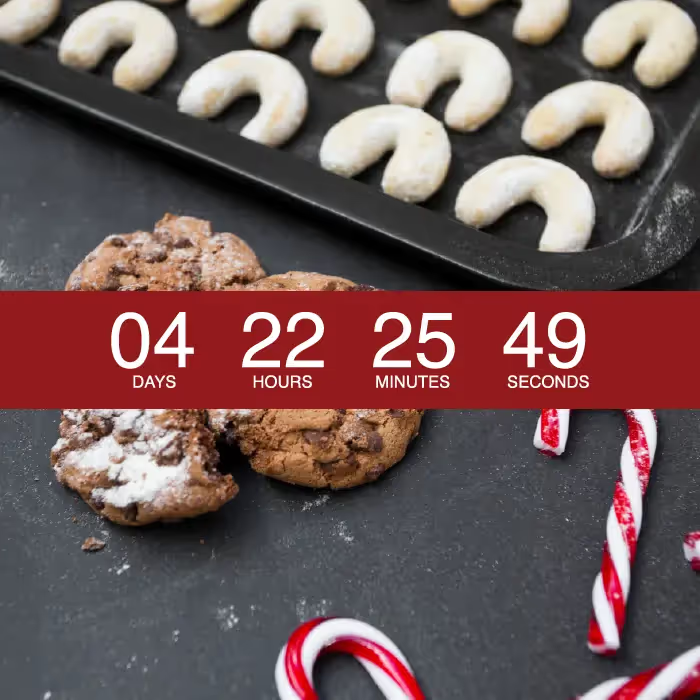
Have you received any emails with Christmas countdown timers and thought, I wonder how they did that? You're in luck, today we'll show you how. Countdown timers in emails are a fun tool for adding dynamic, attention-grabbing motion.
Why add a Christmas countdown timer?
Honestly, we're surprised we haven't seen more December timers in emails this season. More brands should consider using them! Here's why:
- Adding Christmas countdown tickers is easy! It's just a matter of copying and pasting a few lines of code.
- Timers captivate readers' attention better than static images.
- A countdown creates urgency. Seeing a ticking clock gives readers an incentive to act now, resulting in a conversion rate that increases by as much as 400 percent for some brands.
- Including a timer demonstrates that your brand is visually sophisticated, innovative, and thoughtful.
Plus, the festive holiday season is the perfect time to use a timer. With time-sensitive promotions and shipping deadlines, not to mention a flood of competing emails, seasonal timers are a smart way to send a clear message, add visual interest, and help your message stand out. And you don't have to save these timers just for Christmas — they're an awesome way to jazz up your emails when New Year's rolls around, too.
Christmas countdown design inspiration
You don't have to set your countdown timer for December 25 — you can also use it to count down to when a sale will end, or notify a customer when their free trial is almost over. One brand used a timer with a countdown to the shipping deadline day to receive orders in time for the holidays. Another brand used a mid-December email with a countdown timer to notify readers that it's time to get moving on their order. A third brand got creative: instead of creating a ticker with the numbers running, they added a calendar strip at the top of the email with an X on the day the message was sent. The sky's the limit with countdown timers, and remember, they're easy to create and insert into a message. Plus, 99 percent of email providers display countdown timers correctly, meaning almost all of your email list can enjoy them.
Tools you'll need
- Use an email design tool to build and design your email message.
- Use a free email countdown timer generator. Look for one that's simple to use and creates the timer as an animated GIF, so it will render well in email. A number of online platforms offer easy-to-use countdown timers to add to any email campaign.
You can also use looped GIFs as your countdown timer by choosing a timer GIF from Tumblr or Giphy and inserting it into the email. HTML timers load more quickly, though; they also look professional, and aren't that difficult to make.
Your how-to guide
Step 1: Design the email
Start with a basic single-column template. Trim your inspiration image and add it to the template. You don't need any "hours left" text at the top because that's where the timer will be placed, and plain text (the fine print) will also be added to the bottom of the email. Doing this will balance the text-image ratio better, which is an email design best practice. To create a placeholder for the countdown timer, add an HTML block. This is where the timer code will be dropped once it's created.
Step 2: Make the countdown timer
Creating a free email countdown timer is a pretty straightforward process. After entering an email address, add the campaign end date. You can set a date that's up to a month out. (Remember to keep time zones in mind as you choose your end date and time.) Next, update the background and number colors. Use an online HTML match tool to find the exact colors (with hex codes) that you want, then generate the HTML code for the timer. Copy the code from the text box and paste it into the HTML content block. To give some context, drag in a text box either above or below it, then add a short line of copy. For an extra personal touch this holiday season, you could even consider using a similar approach to create a Christmas countdown email signature.
There's no excuse not to try countdown timers
There's no excuse not to try countdown timers in your next holiday email campaign! Now, how many days until Christmas?
Articles to wet your whistle



.png)
Subscribe to our newsletter.
Dive into the world of unmatched copywriting mastery, handpicked articles, and insider tips & tricks that elevate your writing game. Subscribe now for your weekly dose of inspiration and expertise.