

5 Creative Ways to Design Roundup List Emails
Discover 5 creative ways to design roundup list emails. Engage your audience with curated content!

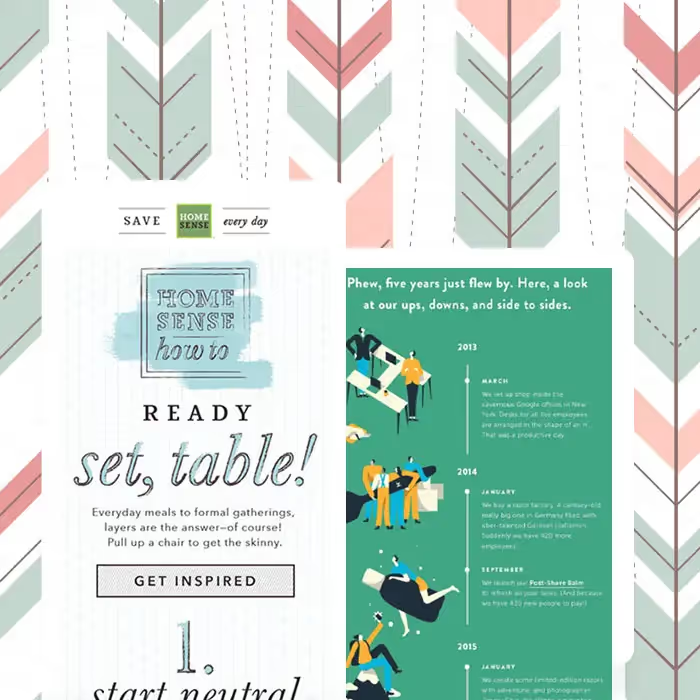
Roundup list emails are a fun and dynamic way to present content. Your roundup email might list top blog posts or most popular products, walk readers through a step-by-step process or timeline, show social media shares or comments from brand loyalists, or organize pretty much any kind of list you can imagine. The use of numbers in roundup emails helps keep readers' eyes moving down the page, and the layout can vary in plenty of dynamic and engaging ways. Let's get inspired by checking out these creative roundup emails.
01. The Cluster
One brand uses a cluster approach to give a sense of movement to its design. The white space and font choice also give the design a more polished look, like a magazine spread. Keeping each module compact, and minimizing text descriptions, makes this email easy to scan. Another example uses an asymmetrical, collaged look that's more playful, paired with a plain-text legend beneath the image cluster — a great way to balance out your design and make it even more mobile-friendly.
02. The Timeline
One brand celebrated its five-year anniversary with a roundup email chronicling the brand's milestones through the year, even including a few flubs to laugh at itself. While built as a series of images, you can add plain text atop images in a timeline, or use a two-column design to arrange images next to text blocks. Another brand used a roundup email to showcase products for every day of the week in a single-column layout with plenty of white space — a fun opportunity to make CTA button copy playful and specific to each day rather than repeating "Shop Now" for every module.
03. The Animated How-To
One brand had fun with an animated how-to email, more of a 1-2-3 process than a roundup, but worth including for its cleverness. While the usual advice is to keep emails simple and avoid making them feel like websites, sometimes longer, snazzier content earns its place. Whatever you do, test, and see how readers respond to both short and long emails.
04. The Z-Pattern
A welcome email built around a peachy HTML background color and well-styled plain type shows how a roundup section can be balanced and nicely laid out using Z-patterns — alternating the left or right-alignment of images and text. This works really well for lists that include images, as long as images are the same size and the amount of text in each block is similar.
05. Block by Block
An airy, ethereal list uses a rare three-column layout that works because of its design simplicity. While each row is an image, you could create the same responsive effect with a three-column structure using plain text on either side of the middle image, buffered by ample padding for a sleek, bright vibe. Another way to separate content blocks in a list or roundup is by alternating the HTML background colors of each block, positioning images in a different spot in each module to feel extra playful and fun.
Articles to wet your whistle


.png)
Subscribe to our newsletter.
Dive into the world of unmatched copywriting mastery, handpicked articles, and insider tips & tricks that elevate your writing game. Subscribe now for your weekly dose of inspiration and expertise.